Recap
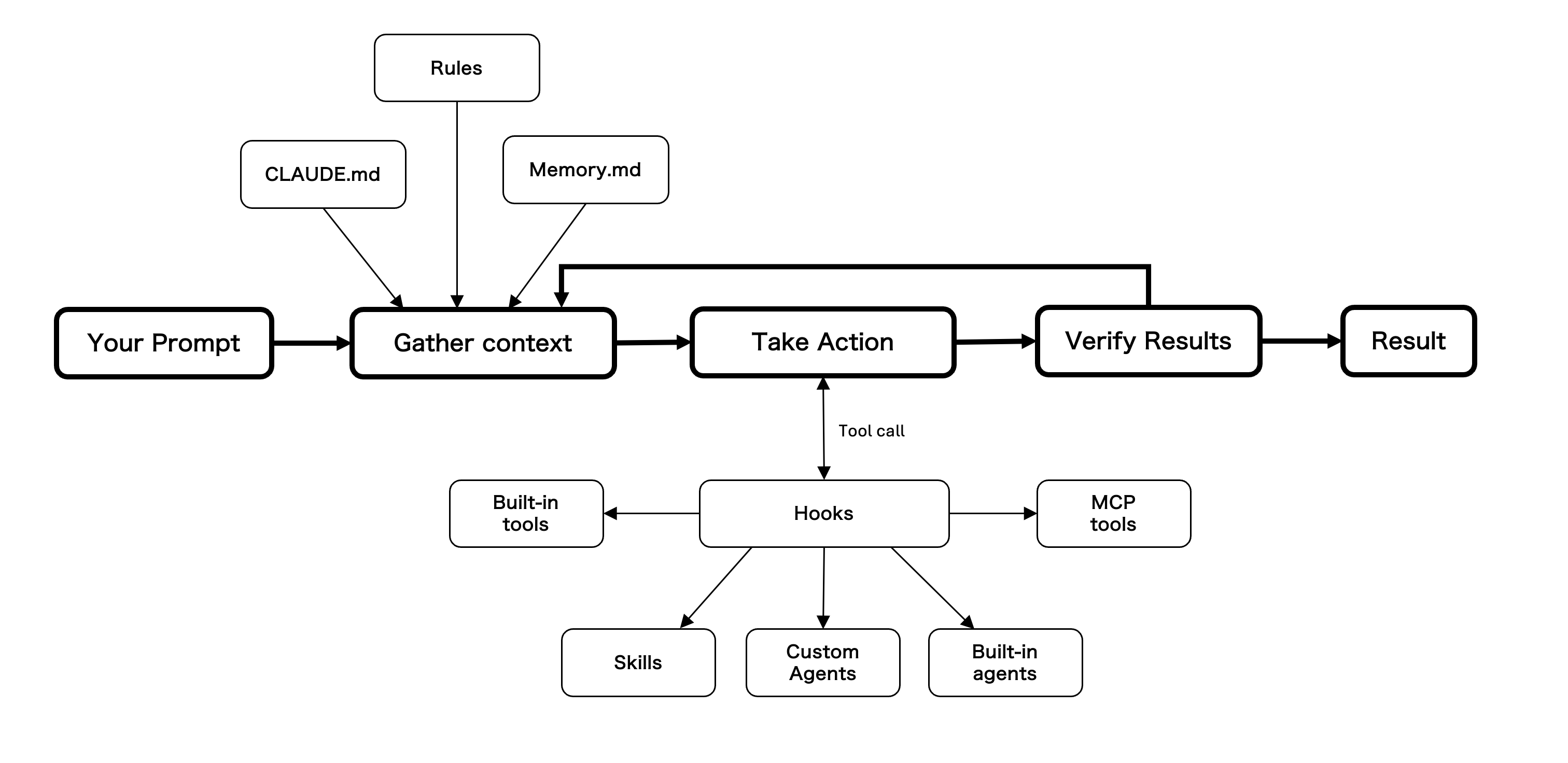
You have now walked through the three sections that make up the Claude Code fundamentals: Foundation (how Claude Code thinks), Configuration (how to shape what it sees and what it can do), and Extensions (how to give it new capabilities). This page pulls everything together in one picture.
At the heart of Claude Code is a single loop — Gather context, Take action, Verify results — running over and over until the task is done. Everything you learned in this workshop either feeds the loop, intercepts the loop, or is something the loop can reach for.
Foundation was about the engine room: how Claude Code actually works as an agent.
| Concept | What it is |
|---|---|
| Agentic loop | Gather context → Take action → Verify results → loop back until done. Not a chatbot — a worker that cycles through tool calls toward a goal. |
| Context window | Everything Claude "sees" in a session — system prompt, loaded files, tool results, conversation. Finite. Must be managed. |
| Tools | Built-in capabilities (Read, Glob, Grep, Edit, Bash, Task, etc.) that Claude picks from during Take Action. |
| Sub-agents | Specialists like Explore and Plan with their own isolated context windows. Keep the main session's context clean. |
| Plan Mode | Think-before-act checkpoint. Combined with reasoning effort (/model dial) and per-prompt keywords (ultrathink), gives you control over how much Claude deliberates before acting. |
The "Your Prompt → Gather context → Take Action → Verify Results" spine in the diagram is this section made visual. Everything else on the diagram is attached to some part of that spine.
Configuration was about the files on the left of the diagram — the inputs that flow into Gather context every cycle.
| Artifact | What it does | Where it shows up in the diagram |
|---|---|---|
| CLAUDE.md | Persistent project and user knowledge across sessions. Four tiers: Managed policy, User, Project, Local. | Feeds Gather context |
| Settings | Permissions (what tool calls are allowed), environment variables, hook configuration. Not shown as a node — settings live between Take Action and Hooks, gating every tool call. | Implicit on the Take Action → Hooks edge |
| Rules | Path-scoped instructions that load only when Claude reads a matching path. Keeps the always-on CLAUDE.md small. | Feeds Gather context |
| Auto memory | What Claude decides is worth remembering across sessions (MEMORY.md + topic files). Non-deterministic — Claude chooses when to save. | Feeds Gather context as Memory.md |
The common thread: Configuration shapes what Claude knows going into each loop iteration, and what it's allowed to do within that iteration.
Extensions live on the right of the diagram — things Take Action can invoke through the Hooks gate.
| System | What it does | Where it shows up in the diagram |
|---|---|---|
| Skills | Packaged workflows, user-invocable via slash commands or auto-discovered by context. Their metadata loads at start; their contents load when invoked. | Not drawn as a node — invoking a skill is itself a tool call that passes through Hooks |
| Custom Agents | Delegatable specialists with isolated context windows. You define their prompt, their tools, their scope. | Target of a Take Action tool call |
| Hooks | Structural enforcement at lifecycle events. Cannot be overridden by prompts. Gate every tool call before it runs. | The middle layer between Take Action and every tool |
| MCP | Model Context Protocol — the standard interface for connecting Claude to external services (GitHub, Jira, AWS, Slack…). MCP tools show up alongside built-in tools. | MCP tools — Hooks-gated, same as built-in tools |
The common thread: Extensions give the loop more things to reach for, and Hooks make sure every reach is audited.
Each piece of this workshop — mindset shift, context window, sub-agents, Plan Mode, CLAUDE.md tiers, rules, auto memory, skills, custom agents, hooks, MCP — maps to a specific place on this diagram. When you build something new with Claude Code, you are always doing one of these four things:
- Changing what enters the loop (edit CLAUDE.md, add a rule, nudge auto memory)
- Changing what the loop can do (allow a tool in settings, add an MCP server, write a skill)
- Changing how the loop is gated (add a hook)
- Changing who runs part of the loop (spawn a sub-agent, write a custom agent)
Everything in .claude/ is git-controlled. Commit it, and your teammates inherit the same Claude Code on first clone — same context, same rules, same skills, same agents, same hooks. That is the real point of configuring and extending Claude Code: your tuning becomes a shared team artifact, not a personal secret.
You are now ready to put all of this to work across the SDLC phases.